


Are you struggling to organize your notes, remember critical information, or turn knowledge into actionable insights? Whether you’re running a business, studying, or learning a new skill, the Cornell Note-Taking System can transform the way you capture, process, and apply information. In this article, you’ll learn how to implement the system, practical strategies to maximize its benefits, and real-world examples that make it actionable in business, academics, and everyday life.
What is the Cornell Note-Taking System?
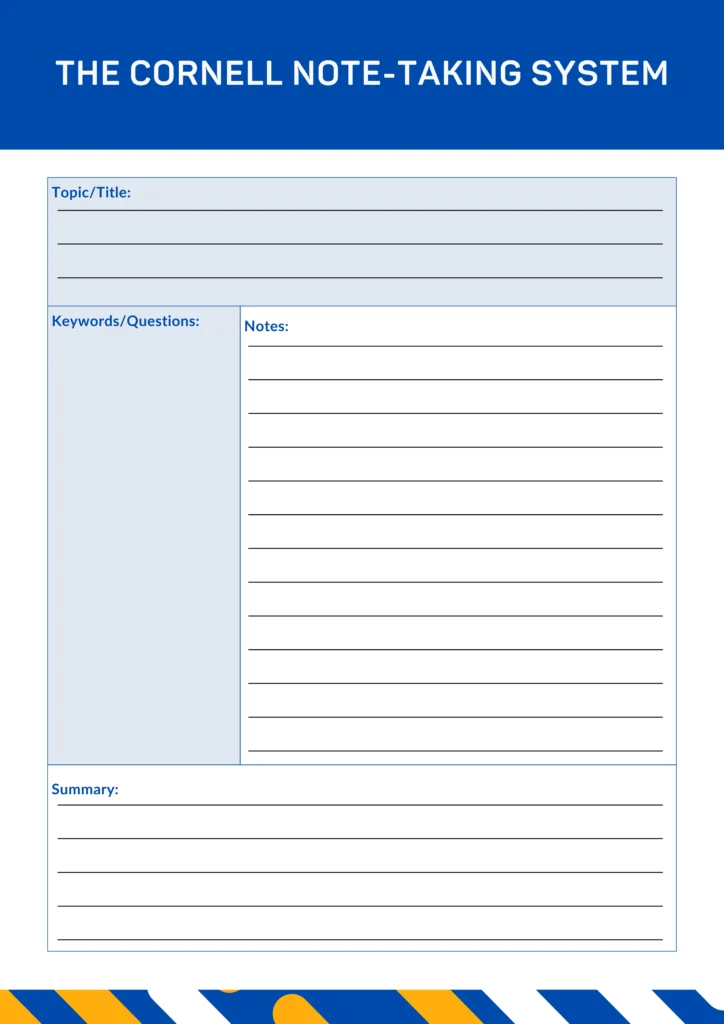
Developed by Dr. Walter Pauk at Cornell University in the 1950s, the Cornell Note-Taking System is a structured method for organizing notes. Unlike traditional linear note-taking, which often becomes messy and hard to review, the Cornell system divides your notes into three key sections:
- Cue Column (Left Column): Questions, keywords, or prompts.
- Note-Taking Area (Right Column): Main detailed notes and ideas.
- Summary Section (Bottom): A concise recap that reinforces memory and understanding.
This structure ensures you engage actively with the content, making it easier to retain, recall, and apply knowledge.
Why the Cornell Method Works Across Contexts
- For Business Professionals: You can turn meeting notes, research reports, or training sessions into actionable insights. Cue questions help you focus on decisions, while summaries highlight next steps.
- For Students: Instead of rote memorization, Cornell notes encourage active recall and understanding, improving exam preparation and learning retention.
- For Everyday Life and Self-Learning: From reading books to attending workshops or online courses, you can capture insights in a way that’s organized and ready for practical use, whether planning a project or learning a new skill.
Setting Up Your Cornell Notes
Here’s a step-by-step guide for any context:
Step 1: Divide Your Page
- Draw a vertical line about 2.5 inches from the left for the cue column, leaving the right side for notes. Reserve the bottom 2 inches for the summary.
Step 2: Take Notes in the Right Column
- During a lecture, meeting, or research session, write concise points, diagrams, or charts. Focus on ideas, not word-for-word transcription.
Step 3: Add Questions or Cues
- After the session, write keywords or questions in the left column to trigger memory and reflection. For Example:
- Notes: “Video content generates 60% more engagement than static posts.”
- Cue: “Which content type drives higher engagement?”
Step 4: Write a Summary
At the bottom, write a short paragraph summarizing the main insights. This turns the page into a quick reference.
Practical Applications
- Business
- Meetings & Strategy Sessions: Track action items and insights for easier follow-up.
- Marketing & Content Planning: Structure research and ideas for campaigns.
- Academics
- Lecture Notes: Organize key points, examples, and exam questions.
- Study Aid: Summaries and cues make revision efficient and focused.
- General Knowledge & Learning
- Workshops & Online Courses: Capture critical lessons and apply them immediately.
- Book Notes & Research: Retain information and link insights across projects.
Real-World Example
Scenario: Learning a new digital marketing strategy
- Cue Column:
- Best social media platforms
- Engagement metrics
- Posting frequency
- Note-Taking Area:
- Instagram Reels drive 3x more engagement
- TikTok videos perform best in the evenings
- Audience responds to educational content
- Summary:
- Video content on Instagram and TikTok drives engagement when posted at peak times. Focus on educational, concise videos for higher impact.
Digital Tools for Cornell Notes
Digital tools can make the Cornell Note-Taking System more organized and accessible for business, academic, or personal use.
- Notion, Evernote, OneNote: Use templates to structure your notes by projects, courses, or topics. Easily store, search, and review your cues, notes, and summaries.
- PDF Templates: Print-ready Cornell layouts allow you to take notes by hand and keep them consistent. You can also scan and store them digitally for easy reference.
These tools make it simple to capture, organize, and revisit your notes anytime, keeping your learning and insights actionable.
Download your free Cornell Note-Taking PDF template here: Download PDF (Cornell Note-Taking System – PDF Template)
Tips to Maximize the Cornell System
- Review Regularly: Reinforce memory using the cue column.
- Keep it Concise: Avoid overwhelming pages; focus on actionable insights.
- Use Visuals: Diagrams, charts, and bullet points improve recall.
- Apply Immediately: Convert summaries into actionable steps.
- Personalize Cues: Make cues meaningful to your context for better retention.
Conclusion
The Cornell Note-Taking System is a powerful tool for anyone who wants to organize, retain, and act on knowledge, whether in business, academics, or personal learning. By adopting this system, you can streamline decision-making, improve productivity, and make your knowledge actionable.
Start using Cornell notes today and turn information into real results
Download your free PDF template now and transform the way you capture and apply knowledge: Download PDF